
The review flow
Here's how a guest review works from start to finish:
Guest opens the Guidebook
When a guest visits their Guidebook, a review request modal appears automatically after a few seconds — no action needed on your part.
Guest leaves a review
The modal lets guests rate their stay from 1 to 5 stars and optionally write a short comment. It takes under a minute and requires no account.
 Screenshot: Review modal
The review request modal appearing over the Guidebook on a mobile phone, showing a 5-star rating selector and an optional comment field
Screenshot: Review modal
The review request modal appearing over the Guidebook on a mobile phone, showing a 5-star rating selector and an optional comment field
Review lands in your admin
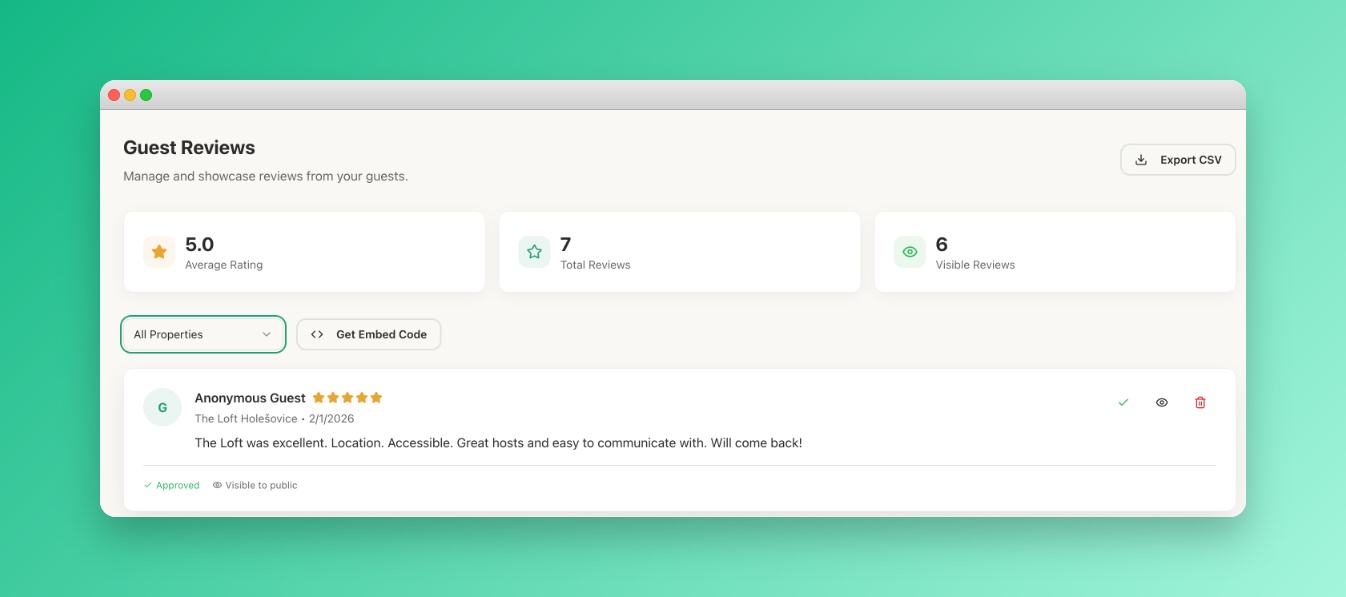
Submitted reviews appear in your admin panel under Reviews. If you manage multiple properties, use the property filter to see reviews for a specific one.
Moderate and showcase
Approve reviews to make them public, hide ones you'd rather not display, or delete them entirely. From the same page, grab the Embed Code to display your reviews on your own website or anywhere embeds are supported.
 Screenshot: Reviews admin page
The /Reviews admin page showing a list of guest reviews with star ratings, a property filter dropdown, and Approve / Hide / Delete action buttons
Screenshot: Reviews admin page
The /Reviews admin page showing a list of guest reviews with star ratings, a property filter dropdown, and Approve / Hide / Delete action buttons
Review moderation
Every review comes in as pending. From the Reviews page you can:
- Approve — makes the review visible publicly in your Guidebook and embed widget.
- Hide — removes it from public view but keeps it in your dashboard.
- Delete — permanently removes the review.
You cannot edit a guest's review text — only control its visibility.
Embedding reviews on your website
On the Reviews page, click Get Embed Code to copy a snippet you can paste into any website or platform that supports embeds. Approved reviews update in the widget automatically.
For more detail, see Embedding Reviews.